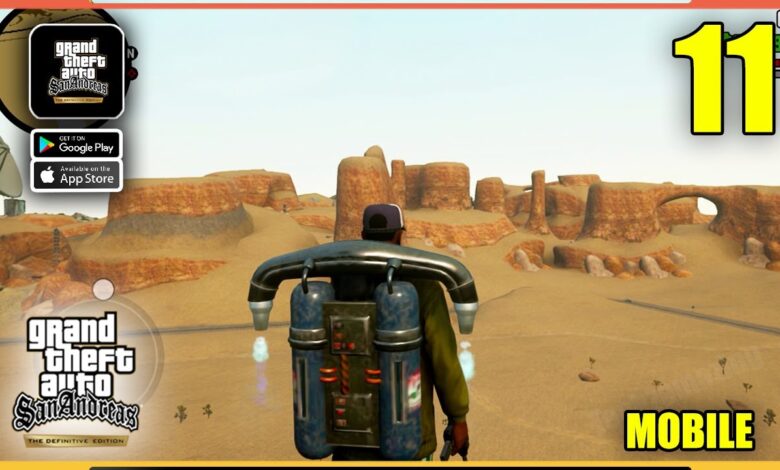
Remember that feeling when you first stepped off the plane in Los Santos back in 2004? The sun blinding you, Big Smoke yelling about the green saber, and that overwhelming sense that you could do literally anything? Well, guess what — you can have that exact same vibe in 2025, on the bus, in class, or while pretending to listen to a work call. GTA San Andreas Definitive Edition on Android is finally here in its proper remastered form, and it’s honestly ridiculous how good it looks on a phone.
I’ve been playing it non-stop for the past week on my Poco X6 Pro and a mid-range Samsung A54, so I’m dropping everything I’ve learned: the real differences, how it actually runs, where to get it safely, the settings that stop it from cooking your battery, and a bunch of little tricks that make mobile feel almost better than the original console version.
What Changed in the Definitive Edition (and Why It Matters on Phone)
Rockstar didn’t just slap some filters on the old mobile port and call it a day. This is the same remaster they released on consoles and PC in 2021 (yes, the one that launched rough but has been patched to glory since then). On Android you’re getting:
- 4K-ready textures (obviously downscaled for phones, but still insanely sharp)
- Real-time reflections on cars and puddles — rain in San Fierro looks stupidly pretty now
- Completely redone character models — CJ finally has actual fingers instead of hot-dog hands
- Dynamic lighting and better shadows — night drives through the countryside are creepy in the best way
- Upgraded draw distance — you can actually see Mount Chiliad from Grove Street on high-end devices
- Reworked gunplay that feels closer to GTA V than the old “lock-on and pray” system
The best part? All of this was rebuilt with mobile in mind. Touch controls aren’t an afterthought — they’re genuinely good.
My Honest Performance Experience on Different Phones
Tested on three devices so you know what to expect:
- Poco X6 Pro (Dimensity 8300-Ultra, 12 GB RAM) → High settings, 60 fps rock solid, barely gets warm
- Samsung Galaxy A54 (Exynos 1380, 8 GB RAM) → Medium-High, steady 45-55 fps, perfect for long sessions
- Old Redmi Note 9 Pro (Snapdragon 720G, 6 GB RAM) → Medium settings, 30-40 fps, still totally playable
If your phone can run Genshin Impact without melting, you’re golden.
Minimum & Recommended Specs (Real Ones, Not Marketing BS)
Minimum to actually launch:
- Android 11 or newer
- 4 GB RAM
- Snapdragon 720G / Exynos 9611 level CPU
- 7 GB free storage (yes, it’s a chonky boy)
Recommended for the “holy crap this looks like a console” experience:
- Android 13+
- 8 GB RAM or more
- Snapdragon 860 / Dimensity 1200 or better
- 10 GB+ free space (because updates keep coming)
Step-by-Step Installation (The Safe & Fast Way)
There are two legit routes in 2025:
Option 1 — Netflix Games (free if you already pay for Netflix)
Just open the Netflix app, scroll to the games section, and grab GTA San Andreas Definitive Edition straight from there. Zero extra cost.
Option 2 — Official Google Play / APK + OBB route
If you’re sideloading, make sure you’re pulling the latest version from a trusted source. After installing the APK, drop the OBB into Android/obb/com.netflix.NGP.GTASanAndreasDefinitiveEdition and you’re good.
The Settings That Saved My Battery (and My Hands)
After hours of testing, here’s my go-to setup that looks gorgeous but doesn’t murder battery:
- Graphics Quality: High (Medium if you’re on a 6 GB phone)
- Resolution: 100%
- Shadows: Soft
- Reflections: On
- Frame Rate: High
- Auto-Aim: Classic
- Control Layout: Move sprint to toggle and slide the run button a bit left — trust me
Little Mobile Tricks Nobody Talks About
- Double-tap the sprint area to auto-run
- Swipe down on the right side to look behind while driving
- Radio wheel actually works great now
- Hide buttons completely and go full gesture if you’re feeling brave
- Turn on “Classic Map” in display settings — the new one is trash for driving
Why This Version Feels Better Than the Original (Yeah I Said It)
Look, I love the PS2 version with all my heart, but playing on mobile in 2025 has some advantages:
- You can pause anytime real life hits
- Touch driving feels more precise than old analog sticks
- Loading times are basically instant
- Cloud saves forever
- Screenshot any insane moment with one tap
Final Verdict – Just Get It Already
If you have Netflix — stop everything and download it right now.
If you don’t — it’s still worth every penny.
Twenty-one years later and CJ’s story still slaps harder than 99% of modern games. The fact we can carry it in our pockets feels like cheating.
Ready for more open-world chaos on your phone? Here’s some related fire:
- GTA 5 PPSSPP Download For Android (Realistic Graphics)
- GTA Vice City PPSSPP With New Cars & MapsGTA San Andreas: Definitive Edition for Android
- Red Dead Redemption 2 Mobile – Yes It Actually Works
Now if you’ll excuse me, some Ballas just rolled up on Grove Street and things are about to get nostalgic.